Python for Data Science

Why Python:

Simple(Syntax as Simple English), Open Source , Libraries supported by large and Active Community ,

Table of Contents

1. Operators

2. Variables and Variable Naming Conventions

3. Data Types in Python

4. Conditional Statements

5. Looping Statements

6. Functions

7. Packages in Python

8. Hands-on with Pandas Library

1. Operators: Symbolic Representations of Mathematical Tasks

  • Arithmetic Operator : +,-,*,-,% ,//, **
  • Conditional Operator : Returns True/ False with : <, <=, ==, >=, >, !=
  • Logical Operator : and, or, not
Python Commands Output
3 + 5 / 45-54 * 4 – 212.88888888888889
# "DataScientist"+3 Gives Error

"DataScientist "*3

‘DataScientist DataScientist DataScientist ‘
"DataScientist "+ "3 " ‘DataScientist 3 ‘
45>43 True
56<34 False
34*34 > 34*34 False
34*34 == 34**34 False
0 and 3 0
3 and 0 0
3 and 5 # Gives 2nd value (in Python) 5
0 or 3 3
3 or 5 # Returns 5 3
True and False False
True or False True

2. Variables and Data Types

  • Variables are names bounded to objects
  • Case Sensitive, start with character or _underscore (not Number)
  • Data Int, Float, Bool, String, (IFBS)
a = 5

a

5
print(a) 5
A=4 # Case Insensitive

print(A,a)

4 5
a = 5

b = 7

a = b

print(a,b)

7 7
_a5 = 5

type(_a5)

int
b = "Data Scientist"

type(b)

str

3. Conditional Statements

  • If arrived home early: then cook, else order on swiggy!
  • If-else statements: Single Condition
if(condition):

statement1

else:

statement2

—-

if(time == late):

food = swiggy

else:

food = cook

if(condition1):

statement1

elif(condition2):

statement2

else:

statement3

Assume a variable x, print “positive” if x is greater than 0, ‘Zero’ if x is equal to 0 or “negative” if x is less than 0

x = -23432*-323

if(x == 0):

print("X is Zero")

elif(x > 0):

print("X is Positive")

else:

print("X is Negative")

# Take a variable X and print "Even" if the number is divisible by 2, otherwise print "Odd"

x = 9.3

if(x%2 == 0):

print("Given Number x: ", x, "is EVEN ")

else:

print("Given Number x: ", x, "is Odd ")

# Take a variable y and print "Grade A" if y is greater than 90, "Grade B"

# if y is greater than 60 but less than or equal to 90 and "Grade F" otherwise

y = 89.1

if(y > 90):

print("Grade A, Congratulations")

elif(y >60 and y<=90):

print("Grade B, All the best")

else:

print("Grade F, Long way to Go..!")

4. Looping Constructs

For Loop
for i in range(11,50):

print(i)

# For Loop to print all the numbers between 10 and 50
for i in range(11,50):

if(i%2 != 0):

print(i)

range(start, stop[, step]) -> range object

# For Loop to print all the ODD numbers between 10 and 50

But Another Option:

for i in range(11,50,2):

5. Functions

  • Reusable piece of code – created for Solving SPECIFIC Problem
def function_name(inpu_argument):

statement1;

statement2;

return some_var;

def area_circle(radius):

area = 3.14*r*r

return area

def compare(a,b):

if(a>b):

greater=a

else:

greater=b

return greater

compare(10,50)

>50

6. Python Data Structure

  • Existing DataType: int,float, bool, str – can be stored in Single FORMAT only
  • 2 Data Structure:
  • Lists :– With Sequence : [1,’Python’, 2, ‘is’, 3, ‘Awesome’]
  • Dictionaries :- Without Sequence: {‘Ramesh’:150, ‘Sudesh’:160, ‘Suresh’:146}

7. Lists

  • Ordered Data Structure – with elements separated by comma – enclosed with Square Brackets
  • Extract Single Element: list[index#] # Index
  • Extract Sequence: List[0:4] # Starts with 0 and Stops at 3 (not 4-1)
  • List Functions: append(), extend([another_list]), remove() , del list[index#],
  • Accessing List: for i in list_name: print(list)
# Creating a List

marks=[1,2,3,4,5,6,7,8,9,10]

marks

[1, 2, 3, 4, 5, 6, 7, 8, 9, 10]
marks[5] # Index starts at 0 6
# Get Elements till 6

marks[0:6]

[1, 2, 3, 4, 5, 6]
# Adding an element

marks.append(11)

marks

[1, 2, 3, 4, 5, 6, 7, 8, 9, 10, 11

marks.extend([12,13])

marks

[1, 2, 3, 4, 5, 6, 7, 8, 9, 10, 11, 12, 13, 12, 13]
marks.append([14,15])

marks

[1, 2, 3, 4, 5, 6, 7, 8, 9, 10, 11, 12, 13, 12, 13, [14, 15]]
# Deleting elements in List

marks.remove([14,15])

del marks[0]

# Deleting by Actual

# Deleting by Index Value

# Accessing List & Operating on Elements with For

for mark in marks:

print(mark*100)

200

300

400

8. Dictionaries

  • Un-Ordered Data Structure – Elements are stored in {Key : Value} pairs
  • Add Elements to dictionary with: update() function ; Delete with: del dict(‘Key’)
marks={‘history’:45, ‘Geography’:54, ‘Hindi’:56}

marks

{‘Geography’: 54, ‘Hindi’: 56, ‘history’: 45}
marks[‘Geography’] 54
marks[‘english’] = 47 // Adding Elements

marks

{‘Geography’: 54, ‘Hindi’: 56, ‘english’: 47, ‘history’: 45}
marks.update({‘Chemistry’:89, ‘Physics’:98})

marks

{‘Chemistry’: 89,

‘Geography’: 54,

‘Hindi’: 56,

‘Physics’: 98,

‘english’: 47,

‘history’: 45}

del marks[‘Hindi’]

marks

{‘Chemistry’: 89, ‘Geography’: 54, ‘Physics’: 98, ‘english’: 47, ‘history’: 45}

9. Understanding Standard Libraries in Python

  • Built-In Functions provided by ‘Standard Library’
  • Module: Single Python File/Class,
  • Package: Bundle of Modules
  • format: from Package.Module import Function (or)
  • from Package import Module => use dot operator for accessing function
  • Module.function(x,y)

Data Frames

Reading CSV in Python – Introduction to Pandas

  • Pandas: Python Data Analysis Toolkit for READING, FILTERING, MANIPULATING, VISUALIZING and EXPORTING Data
  • Different Varieties of Data: CSV, JSON, HTML, Excel …
import pandas as pd
df = pd.read_csv("data.csv") # Read CSV
df = pd.read_excel("data.csv") # Read Excel

Data Frames & its Operations

  • Data Frame is similar to Excel Tabular datasheet
  • (But) Row Index starts from 0
  • Some Data Frame(df) functions: df.shape(), df.head()/tail(), df.columns, df[“Column”]

Initial Understanding of Data Frame

df.shape (891,12) # 891 Rows and 12 Columns
df.head() df.tail()
df.columns # Display all Column Name
df.info()
df.describe().transpose()
df[‘Embarked’] # Get All values of Single Column
df[[‘Embarked’,’Age’]] # Inside List of Multiple Columns

Indexing a Data Frame

df.iloc[:5] # Selecting ROWs by their positions

Range of Rows : From 0 to 4th Index (5-1)

(If comma not available, then all columns)

df.iloc[:,:2]

# Select All Rows & Columns from 0 to 1 (2-1)

[Rows, Columns] =>

[Start_Row : End_Row , Start_Column : End_Col]

df[df[‘Embarked’]==’C’] # Display All Rows only with EMBARKED=C
df.iloc[:,-2:] Accessing Last 2 Columns with iloc
df.iloc[-10:,:2] # Access last 10 rows and first two columns of the index dataframe
df.iloc[24,4] & also

df.iloc[24:25,4:5]

# Access Element of 25th Row – 5th Column
df.loc[:,[‘Dependents’,’Education’]] # Selecting these 2 Columns only

Data Science Terminologies

Data Science:

The Field of bring out insights from data using scientific techniques is called Data Science.

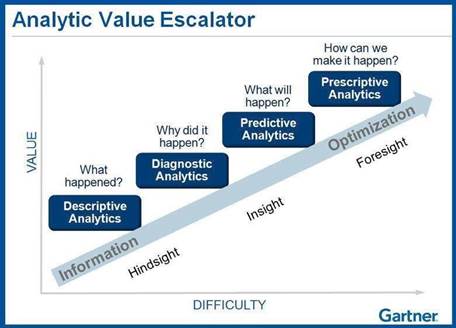
Spectrum of Business Analytics (Value Add to Organization wrt complexity)

MIS – Detective Analysis – Dashboarding – Predictive Modeling – Big Data

Forecasting: is a process of predicting or estimating the future based on the past and present data.

Eg: How many passengers can we expect in a given flight?

Eg: How many Customer calls can we expect in next hour?

Predictive Modeling: used to prediction more granular like “Who are the customers likely to buy the product in next month? & then act accordingly

Machine Learning: is a method of teaching machines to learn things and improve predictions/behavior based on data on their own.

Eg: Amazon/Netflix Recommendation Systems, Algorithm to power google search

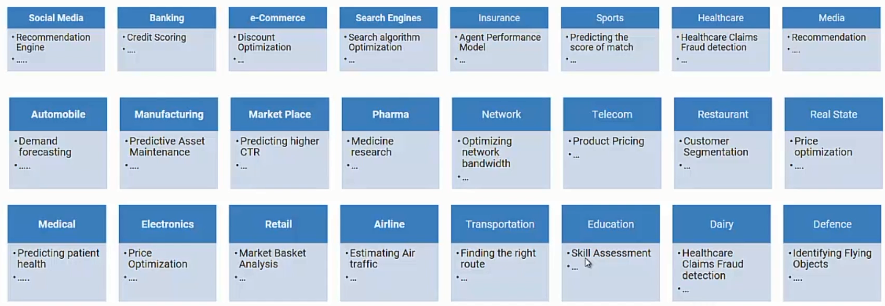
Application of Data Science:

  • Social Media:
  • Recommendation Engine
  • Ad placement
  • Sentiment Analytics

Banking

  • Credit Scoring
  • Fraud Detection
  • Price Optimization
  • Anti-money laundering

e-Commerce

  • Discount Price Optimization
  • Cross-sell and Up-Sell
  • Business Forecasting

Search Engine

  • Search Algorithm
  • Fraud Detection
  • Ad Placement
  • Personalized Search Results

Application of Data Science in Various Domains:

Unsupervised Learning Notes

Definition: Model Bias & Model Variance

Bias Variance
  • Assumptions that we make on ‘Data’
  • Boosting Method to Minimize
  • Variance in Data Set
  • Bagging Method to Minimize sensitivity of data

* The Error we get during the training phase is called BIAS

(3 Eg: Bias for 11th Degree Polynomial is 0, Bias for Plane(linear Model) is High)

  • We want a Model with Low Variance and Low Bias
  • We want to choose model which has less SENSITIVITY to the Variance data
  • Objective of Ensembles: To Minimize Bias & Variance

Supervised Learning:

f(x) –> y f: Function

x:input variable

–>: Maps

y: output label

Supervised Machine Learning is all about ‘Learning a Function’, that maps input(x) to output(y)

This Function could be Regression or Discriminant(Classification)

In supervised learning, we do ‘inductive learning’.

But, Incase of Unsupervised learning, we only have input(x).

Predominant Task under Unsupervised Learning is CLUSTERING.

(Others are ‘Association Mining’, ‘Representation Learning’, ‘Distribution Learning’

Type of Data

  • Names of people: String
  • Classroom test marks: Matrix (Eg: 50 Students, 6 Subjects, 50*6 Matrix)
  • Census Data: Table Data
  • ECG: Need to transform data, to wave form, 1D Time Series Data
  • Video: Time Series with Matrix
  • Song: Time Series with (Sterio: 2 Channel, DolbyAtmos:9 Channel)

3 Sample Temperature Data: (9AM, 27* C), (11AM, 32*C), (12PM, 23*C) – Which Dimension is this Data?

  • In this there is a Time Feature and Temperature Feature , so Dimensionality is = No. of Features (No of Columns)
  • The Data Set is arranged as a Matrix, “ ROWS=Samples, Columns are Features”,
  • Every Column is Feature Column , Every Row is ‘ DATA INSTANCE’
  • ‘n’ rows and ‘p’ columns :- defined in most books, so this matrix is n*p
  • d1: { 9 | 27 } , 1D Vector of Size 2
  • d2: { 11 | 32 } ;;; d3{ 12, 32 } , Although it appears 2 column, its actually 3 Column, for AM|PM (Meridian)
  • Or the other way is to transform ‘AM|PM’ 12Hrs Format data to ‘24Hrs’ Format data to remove ambiguity still with 2 Columns
  • While Transforming Data, think intelligently representing ‘Numeric’ to perform arithmetic operations or identify ‘Best Representation’ to make our life simpler..!
  • For AM|PM/ Categorical data, do ‘ONE HOT ENCODING’
a p
a 1 0
p 0 1
  • Above is for 2, for many columns, this matrix would be wider,
  • With One Hot Encoding, the same temperature data set would become 4 Columns,
  • ‘One Hot Encoding’ is one style, another one is Encoded 1, Eg: Monday:000, Tue:001, Wed:010…

First Stage of Data Preparation:

  1. First Stage: Preprocessing
  2. Second Stage: Normalization

In order to not get affected Euclidean Distance, make Scale Factor of every dimension to be uniform

Curse of Dimensionality: When we have more dimensions (10, 10^2, 10^3..)

Interpretability of the Euclidean Distance measure itself has gone

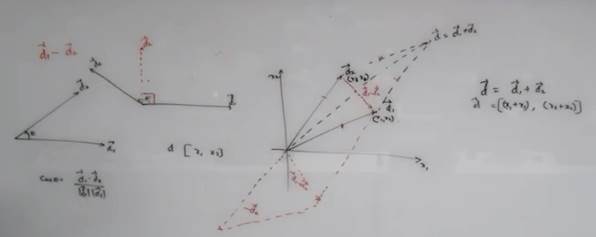
Vector Addition: Just by Extending , Vector Subtraction: Create a mirror and add.

For (data) ‘Similarity’, Angle is what we need to pay attention to..!

2 Data Points : Cos0: 1 => Closer, Cos90:0 => Dissimilar

This is called COSINE SIMILARITY

But still interpretation of Vector Addition is Subject to Domain!

KNN

Analogy: Like person sitting in the classroom, next to each other – by choosing to sit in the next class.

To Choose Neighborhood: Eg: Age, Gender, Language, Field of Work, Proximity to AC Cooling, Average InTime,

Cluster:

Attribute Data, Relational Data, Networked(both) Data

Def: Vantage Point: Is a point of view from where we see: is very important

Sensitivity/Resolution of (Euclidean) measure is controlled by Threshold that we set.

We can figure out the ‘Threshold’ value by Cross Validation

K-Means Cluster

(is motivated by KNN, same idea)

Discover cluster based on the No. given

  • Eg: Start with 3 starting points(membership), called “Centroids”
  • Centroid:= Average of Data Points (in the cluster)
  • It aims to find ‘K’ Centroids by estimating ‘Potential Clusters’
  • Recompute the Centroid, for the new cluster that is formed and repeat.
  • We stop repeating the algorithm, when centroids stop moving
  • Big Disadvantage: K-Means is too sensitive to outliers (Solution: K-Medoids)
  • 2nd Disadvantage of K-Means, we don’t know ‘K’, we need to do educated guess
  • 3rd Disadvantage: If more overlapping data points, repeatability of cluster is not possible, due to initial random centroid selection
  • Intra-Cluster Average Distance” should be minimum – called INERTIA
  • “Inter-Cluster Average Distance” should be Maximum
  • Linear Search: The parameter we’re passing the value in Python: cluster_range = range( 1, 15 )
  • If Data(D) is large, draw sample data(D’) & find K-Centroid – For Very Large Data Sets.
  • K-Means only works for ‘CONVEX Clusters’. – Another Limitation (Convex: Like potato)

When to Choose, Convex/Non-Convex: By Data-Characterization, ie studying various aspects of data.

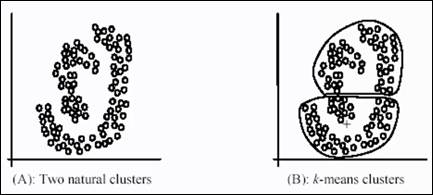
Weakness of k-means:

The k-means algorithm is not suitable for discovering clusters that are not hyper-ellipsoids (or hyper-spheres)

The premise of K-means is to create convex clusters – which does not make sense for above.

So we should have another technique – aiming at DENSE REGIONS.

& that technique is called DBScan

DBScan is a greedy algorithm – it will try to find continuous dense regions.

  • Define a quantity called ‘E’ Epsilon , using this quantity define a circle

Epsilon Boundary:

How best to find epsilon boundary? We’ve to repeat the experiment

Border Points: & Min.Points

  • DB Scan assumes uniform density across data points
  • Data points like this is challenging/setback for DBScan:

Kmeans ++ -> To identify the best k (with ‘k=auto’ in python )

In UnSupervised learning, we have to be very CREATIVE…!

SoftClustering methods: Fuzzy C-Means which allows overlapping of data points across clusters

  • K-Means algorithm is under “Partitioning Methods” (Divide data)
  • “Density Methods” : DBScan
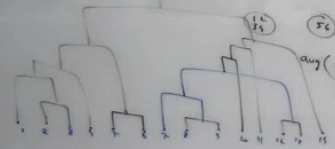
  • “Hierarchical Methods” – drilling down,2 way: 1. Divisive, 2. Agglomerative Style (Popular method)

Agglomerative Style: Start with every data point as cluster , then objective is to merge clusters which are closer to each other

With “Single(Chain) / Complete(Convex) / Average” Linkage

Dendrogram: Tree Like diagram for Hierarchical – Agglomerative Style

We Can cut and choose what granularity level of cluster we want – Advantage of Hierarchical Cluster.

The model is not dependent on the parameter.

We can spawn Python THREAD, to have parallel operation for Agglomerative Clustering

Support Vector Machines

Find Optimal Hyperplane , with slab of width m.

  1. Objective of SVM is to identify Single Unique Decision Boundary
  2. Identify a Slab instead of Decision Margin
  3. The Slack ‘C’: Allow some points to move across the decision surface
  4. The model is only dependent on the support point